EmojiStamp4.0.2
Publisher Description
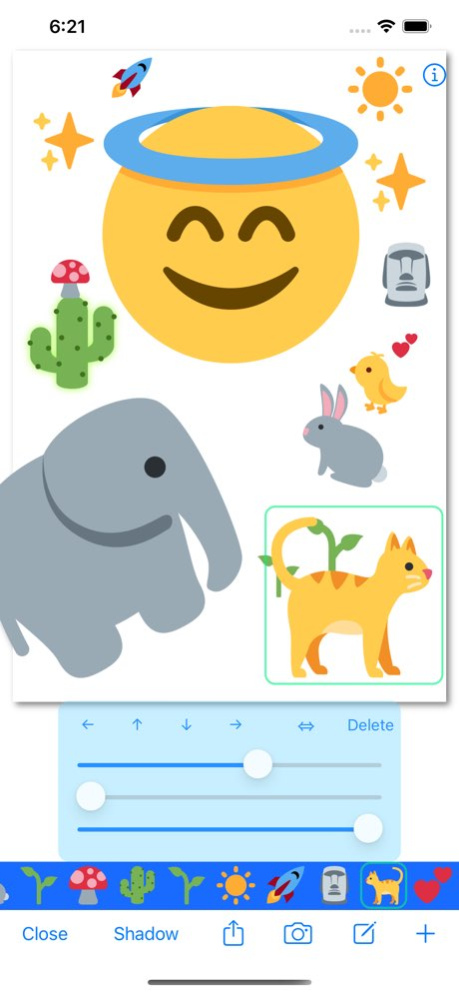


This app can paste Emoji to Photo as stickers.
Let's create an image that can be made only in the iPhone/iPod touch/iPad !
iPhone / iPad Universal App
Supports the color change feature for iOS 8.3 Emoji.
* Recommended system requirements:iOS6.1 and later and Retina display
When less than iOS6.0, please take the following two into consideration.
- The emoji on a button is not displayed well.
- The quantity of an emoji differs.
iOS12.1 and later: 1571 + Twemoji
iOS11.1-iOS12: 1495
iOS 10.2-iOS11.0: 1428
iOS 10-10.1: 1319
iOS 9.1-9.3: 1282
iOS 8.3-9.0: 894
iOS 6.1-8.2: 820
iOS 5.1-6.0: 780
Less than iOS 5.0: 458
--
Twemoji
Copyright 2020 Twitter, Inc and other contributors
Code licensed under the MIT License: http://opensource.org/licenses/MIT
Graphics licensed under CC-BY 4.0: https://creativecommons.org/licenses/by/4.0/
Version History Support for recent iOS. 4.0.2 08/02/2024 Fixed a bug that the placed image does not remove at reset.
Fixed a bug that the setting by the switch in the app was not reflected.
The number of character types that can be displayed when entering text and selecting "Kawaii" has increased.
Thanks. 4.0.1 04/06/2021 - Supports large displays such as iPhone X.
- About 3200 types of Twitter's Twemoji have been added.
- Twemoji can be pasted on an image in the same way as a conventional emoji. 4.0.0 03/28/2021 You can now use emoji added in iOS 12.1 in the app.
and bug fixes.
Enjoy ! 3.4.0 11/26/2018 Fixed a problem that created images can not be saved to the camera roll. 3.3.1 03/05/2018 Supports new Emoji added in iOS 11.1 . 3.3.0 02/09/2018 Added RequestReview feature when update. 3.2.1 07/03/2017 - Fixes for iOS 10.2 .
Added new Emojis of iOS 10.2 . 3.2.0 12/21/2016 - Fixes for iOS 10.
Added new Emojis of iOS 10. 3.1.0 09/20/2016 Bug fixes for iOS 9.3 . 3.0.1 03/31/2016 Added several features.
(1) Many symbols that can be handled as image. (iOS 6.1 and later)
(2) Simple text input feature. (iOS 7 and later)
(3) Support the iOS9.1 Emoji. (iOS9.1 and later)
*(1)and(2) has been added to the far right of the Emoji selection scroll. 3.0.0 01/13/2016 - Upgraded the Share feature.
The view of share feature has changed.
Direct post to the Instagram. ( If the Instagram app has been Installed. )
Direct post to the LINE. ( If the LINE app has been Installed. )
Thanks :) 2.2.1 08/12/2015 Support for the iOS 8.3 Emoji.
- The color change feature.
If you use iOS 8.3 and later, Color button will displayed in the upper left corner of the emoji selection view.
To change the Emoji color, it tap the Color button many times. 2.2.0 07/09/2015 Supports iOS 8 .
Fixes the issue that buttons horizontal scrolling does not work well. 2.1.0 10/27/2014 Thank you for using the EmojiStamp.
Update information
- iOS7 support .
- 4 inch display support .
- Added the background images .
Enjoy :) 2.0.0 02/09/2014 *What's new:
- Blank(square) was added to the background image.
- Image crop setting was added.
- Pictures can be received now from other applications. ("Open in" function)
*Fixed:
- When the Emoji has been arranged on the outside of a picture, the portion which was not able to move the Emoji has been improved.
- Fine tuning function of size for the emoji was added.(a slider)
- The App icon was changed. (a little)
- A memory warning message is no longer displayed. 1.2.0 09/01/2012 What's new:
- The app's icon was changed.
- iPad was supported. (It's a Universal App !)
- iOS4.2 - 5.0 was supported.(*)
* Recommended system requirements:iOS5.1
- The reset button was added on menu of Camera button.
Fixed:
- A hashtag was added for tweet. (#EmojiStamp)
- When opening a picture, it resizes, when large.
e.g.
iPhone: Change to 640x857 from 1936x2592.
iPad: Change to 768x1029 from 1936x2592.
- A picture can open original size by changing a setting.(*)
* It may be unable to save, when size is large.
* Probably, it is good to save in the midst of edit and to open again.
And begin edit again. 1.1.0 08/13/2012 1.0.0 07/22/2012
About EmojiStamp
The company that develops EmojiStamp is tadashi atoji. The latest version released by its developer is 4.0.2.
To install EmojiStamp on your iOS device, just click the green Continue To App button above to start the installation process. The app is listed on our website since 2026-06-30 and was downloaded 5 times. We have already checked if the download link is safe, however for your own protection we recommend that you scan the downloaded app with your antivirus. Your antivirus may detect the EmojiStamp as malware if the download link is broken.
How to install EmojiStamp on your iOS device:
- Click on the Continue To App button on our website. This will redirect you to the App Store.
- Once the EmojiStamp is shown in the iTunes listing of your iOS device, you can start its download and installation. Tap on the GET button to the right of the app to start downloading it.
- If you are not logged-in the iOS appstore app, you'll be prompted for your your Apple ID and/or password.
- After EmojiStamp is downloaded, you'll see an INSTALL button to the right. Tap on it to start the actual installation of the iOS app.
- Once installation is finished you can tap on the OPEN button to start it. Its icon will also be added to your device home screen.
Program Details
System requirements
Download information
Pricing
Version History
version 4.0.2
posted on 2026-06-30
Version History Support for recent iOS. 4.0.2 08/02/2024 Fixed a bug that the placed image does not remove at reset.
Fixed a bug that the setting by the switch in the app was not reflected.
The number of character types that can be displayed when entering text and selecting "Kawaii" has increased.
Thanks. 4.0.1 04/06/2021 - Supports large displays such as iPhone X.
- About 3200 types of Twitter's Twemoji have been added.
- Twemoji can be pasted on an image in the same way as a conventional emoji. 4.0.0 03/28/2021 You can now use emoji added in iOS 12.1 in the app.
and bug fixes.
Enjoy ! 3.4.0 11/26/2018 Fixed a problem that created images can not be saved to the camera roll. 3.3.1 03/05/2018 Supports new Emoji added in iOS 11.1 . 3.3.0 02/09/2018 Added RequestReview feature when update. 3.2.1 07/03/2017 - Fixes for iOS 10.2 .
Added new Emojis of iOS 10.2 . 3.2.0 12/21/2016 - Fixes for iOS 10.
Added new Emojis of iOS 10. 3.1.0 09/20/2016 Bug fixes for iOS 9.3 . 3.0.1 03/31/2016 Added several features.
(1) Many symbols that can be handled as image. (iOS 6.1 and later)
(2) Simple text input feature. (iOS 7 and later)
(3) Support the iOS9.1 Emoji. (iOS9.1 and later)
*(1)and(2) has been added to the far right of the Emoji selection scroll. 3.0.0 01/13/2016 - Upgraded the Share feature.
The view of share feature has changed.
Direct post to the Instagram. ( If the Instagram app has been Installed. )
Direct post to the LINE. ( If the LINE app has been Installed. )
Thanks :) 2.2.1 08/12/2015 Support for the iOS 8.3 Emoji.
- The color change feature.
If you use iOS 8.3 and later, Color button will displayed in the upper left corner of the emoji selection view.
To change the Emoji color, it tap the Color button many times. 2.2.0 07/09/2015 Supports iOS 8 .
Fixes the issue that buttons horizontal scrolling does not work well. 2.1.0 10/27/2014 Thank you for using the EmojiStamp.
Update information
- iOS7 support .
- 4 inch display support .
- Added the background images .
Enjoy :) 2.0.0 02/09/2014 *What's new:
- Blank(square) was added to the background image.
- Image crop setting was added.
- Pictures can be received now from other applications. ("Open in" function)
*Fixed:
- When the Emoji has been arranged on the outside of a picture, the portion which was not able to move the Emoji has been improved.
- Fine tuning function of size for the emoji was added.(a slider)
- The App icon was changed. (a little)
- A memory warning message is no longer displayed. 1.2.0 09/01/2012 What's new:
- The app's icon was changed.
- iPad was supported. (It's a Universal App !)
- iOS4.2 - 5.0 was supported.(*)
* Recommended system requirements:iOS5.1
- The reset button was added on menu of Camera button.
Fixed:
- A hashtag was added for tweet. (#EmojiStamp)
- When opening a picture, it resizes, when large.
e.g.
iPhone: Change to 640x857 from 1936x2592.
iPad: Change to 768x1029 from 1936x2592.
- A picture can open original size by changing a setting.(*)
* It may be unable to save, when size is large.
* Probably, it is good to save in the midst of edit and to open again.
And begin edit again. 1.1.0 08/13/2012 1.0.0 07/22/2012
version 4.0.2
posted on 2024-08-02
Support for recent iOS.
version 4.0.2
posted on 2024-08-02
Aug 2, 2024
Version 4.0.2
Support for recent iOS.
version 4.0.1
posted on 2021-04-06
Apr 6, 2021 Version 4.0.1
Fixed a bug that the placed image does not remove at reset.
Fixed a bug that the setting by the switch in the app was not reflected.
The number of character types that can be displayed when entering text and selecting "Kawaii" has increased.
Thanks.
version 3.4.0
posted on 2018-11-26
26 Nov 2018 Version 3.4.0
You can now use emoji added in iOS 12.1 in the app.
and bug fixes.
Enjoy !
version 3.4.0
posted on 2018-11-26
Nov 26, 2018 Version 3.4.0
You can now use emoji added in iOS 12.1 in the app.
and bug fixes.
Enjoy !
version 3.1.0
posted on 2012-07-23
version 4.0.1
posted on 1970-01-01
2021年4月6日 Version 4.0.1
Fixed a bug that the placed image does not remove at reset.
Fixed a bug that the setting by the switch in the app was not reflected.
The number of character types that can be displayed when entering text and selecting "Kawaii" has increased.
Thanks.
version 3.4.0
posted on 1970-01-01
2018年11月26日 Version 3.4.0
You can now use emoji added in iOS 12.1 in the app.
and bug fixes.
Enjoy !
